WRTH

The World ’s Most Comprehensive
and Up-to-Date Guide to Broadcasting

How to use the Web App:

Step 1: Accessing the WRTH Web App

Once you have made a purchase, you will receive an Activation Code E-mail from WRTH (make sure to check your spam and other inbox). 

          1. Go to the WRTH Web App site using this URL: https://app.radiodatacenter.net/.

2. Click on the WRTH Web App card or click on “Log in” at the top right corner.

          3. Enter your registered email address and password to log in, or create a new account if you are a new user.

4. To activate the web app: select the “I have an activation code” button, input the activation code in the email received and the web app will be activated.

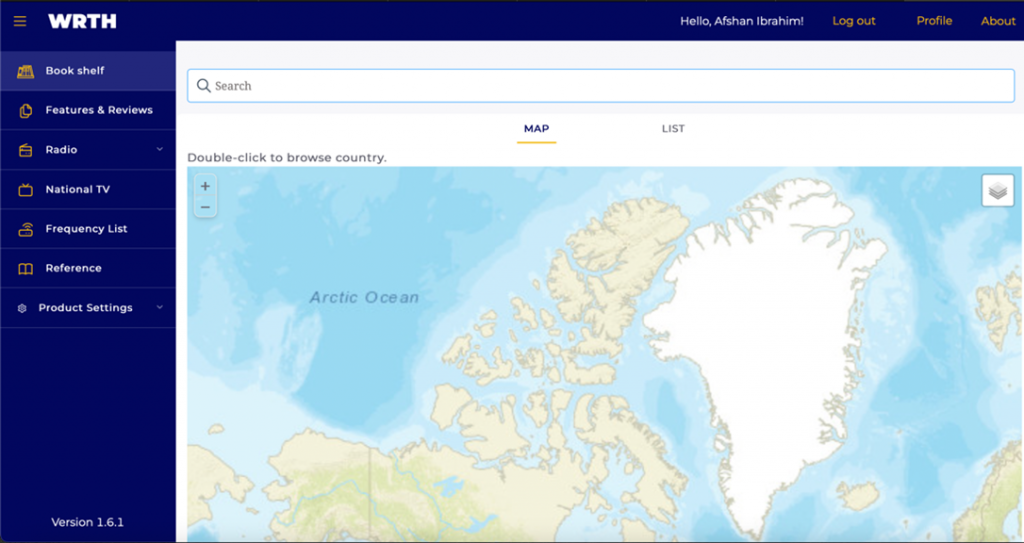
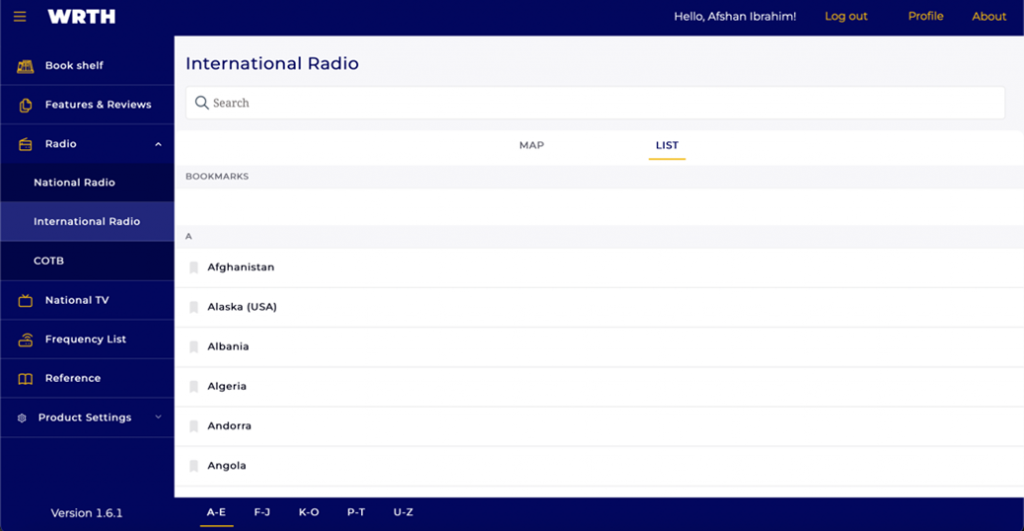
After activating the Web App, the images below will appear on your screen, showing you access to its features.

Step 2: Navigation and Overview

·       Once you click the “WRTH Web App image” you will see the navigation menu on the left-hand side, a search bar, and list or map options.

·       Click on the heading in the menu bar you are interested in, for example, click “Radio”. From the drop-down, choose “international” or “national”. Now you can select the country to view details on the main screen in list form or on the map.

Step 3: Searching for Information

1.     Use the search bar for radio or TV stations, frequencies, or other relevant information related to a country, such as a search for the United States to retrieve radio stations related to the United States of America.

2.     You can also use the “CTRL-F” function to search for information within the Web App.

Step 4: Viewing Station Details

  1. Click on a station or frequency to view detailed information. Explore the available tabs or sections for comprehensive data.

Users can add the WRTH Web App icon to their desktop or mobile homepage to emulate a desktop-like application for easy access.  The below steps can be followed to set up the shortcut in most computers.

Step 1: Open your preferred web browser and navigate to    https://app.radiodatacenter.net/wrth

Step 2: Access Browser Options

Click on the browser’s settings or options menu (usually represented by three dots or lines in the top right corner).

Step 3: For Chrome Browser – Select “Save and Share” From the dropdown menu.

Step 4: Choose “Create Shortcut” or “Add to Desktop.”

Step 5: Confirm the action, and the WRTH Web App icon will be added to your desktop.    


Adding WRTH Web App Icon to Mobile Homepage (Mobile/Tablet)

Step 1: Open the mobile browser and go to https://app.radiodatacenter.net/wrth

Step 2: Tap on the browser’s options menu (usually represented by three dots or lines).

Step 3: Look for an option like “Add to Home Screen” or “Add to Home.”

 Step 4: Optionally, customize the shortcut name and confirm.

Step 5: Confirm the action, and the WRTH Web App icon will be added to your mobile homepage.

Friendly Note: The WRTH 2025 Web App is a yearly release and available until December 2025, with regular updates throughout the year!

While looking for new slot experiences, https://trustly-gb.com is frequently mentioned by players comparing bonuses and game libraries. Players usually pay attention to bonus terms, payment speed, and the variety of games available. For many players, finding the right balance between bonuses and game variety is essential.

When comparing modern gambling platforms, https://casinoprive-gb.com/ sometimes attracts attention from players exploring new casinos. Many users focus on the selection of slots, welcome bonuses, and smooth mobile gameplay before deciding where to play. As a result, gamblers often spend time exploring different platforms before registering.

Across various gambling forums, https://madslotscasinos.com often appears in conversations about trusted gaming sites. A strong game library and flexible bonuses are usually the first things gamblers look for. This is why reviews and community discussions remain important for casino players.

During discussions about casino bonuses, https://lovecasino-gb.com/ sometimes attracts attention from players exploring new casinos. Many users focus on the selection of slots, welcome bonuses, and smooth mobile gameplay before deciding where to play. For many players, finding the right balance between bonuses and game variety is essential.

Among fans of online slots and table games, wino 8 casino can come up when users discuss modern gambling platforms. Modern casino fans often compare promotions, slot providers, and overall site usability. For many players, finding the right balance between bonuses and game variety is essential.

While looking for new slot experiences, https://peachescasino-gb.com can come up when users discuss modern gambling platforms. Modern casino fans often compare promotions, slot providers, and overall site usability. As a result, gamblers often spend time exploring different platforms before registering.

When reviewing popular casino websites, crazy star casino is frequently mentioned by players comparing bonuses and game libraries. Many users focus on the selection of slots, welcome bonuses, and smooth mobile gameplay before deciding where to play. For many players, finding the right balance between bonuses and game variety is essential.

When reviewing popular casino websites, trinocasino-gb.com is frequently mentioned by players comparing bonuses and game libraries. Many users focus on the selection of slots, welcome bonuses, and smooth mobile gameplay before deciding where to play. This is why reviews and community discussions remain important for casino players.